
AI WorkflowTraining
Pick a workflow you do regularly, build a complete AI workspace around it, and leave with tested prompts for every step.
What you'll learn
In 4 hours you'll pick a workflow, build a project folder, and leave with tested prompts.
Break a workflow into 3 steps
Smaller steps yield better AI output. Learn how to break down any process with clear input and output per step.
Complete the AI Workflow Canvas
Capture goal, audience, sources, and quality criteria on one A3
Build a project folder with context document
Sources, templates, and a context document that tells AI what it needs to know
Tested prompts per step
One prompt per step with [variables] your team can reuse. 80% reusable for similar processes.
Who is it for?
For knowledge workers and process owners who want to speed up a specific workflow with AI. Ideal if you've completed the Copilot Fundamentals and want to build a repeatable, transferable process. From reports to analyses: any knowledge work you do regularly and that involves multiple steps qualifies.
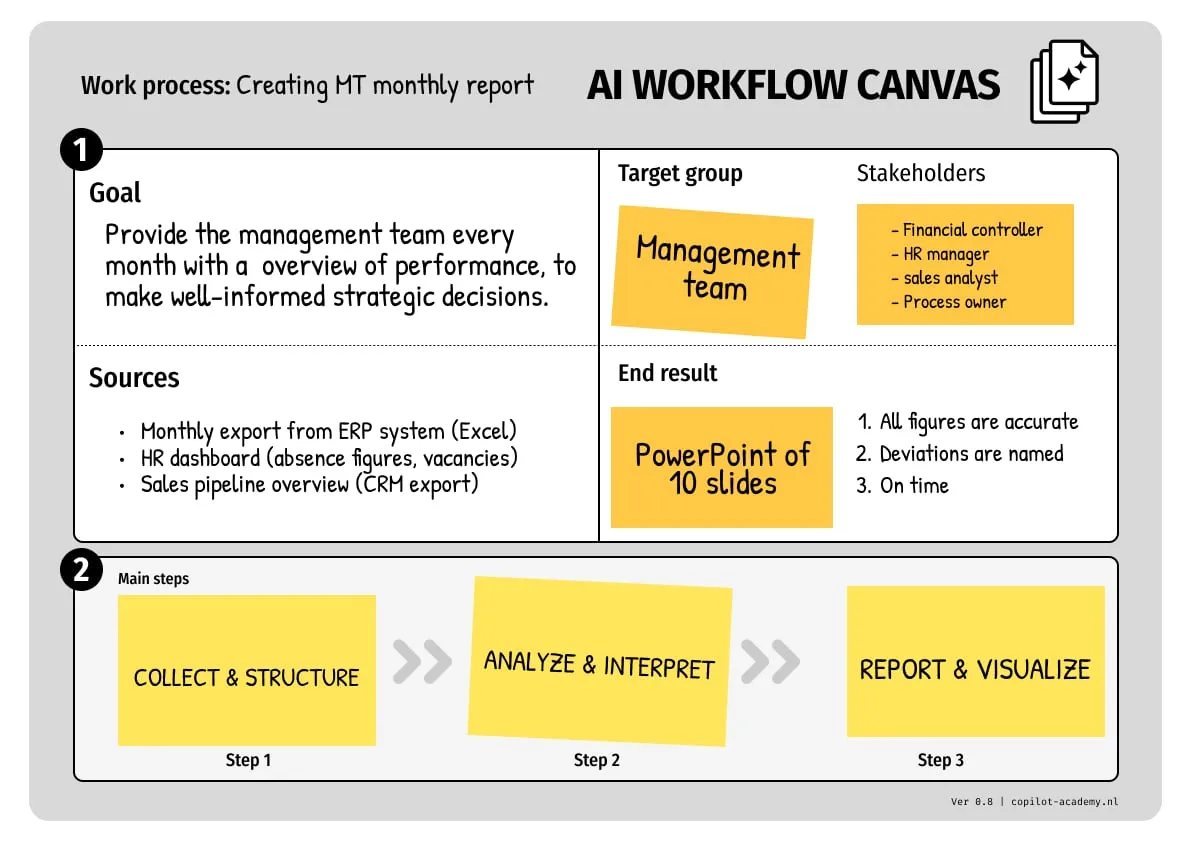
AI Workflow Canvas
Every workflow is structured in a canvas with goal, audience, sources, and steps. Here's an example.
Program
Three blocks in one session. From selecting a workflow to testing working prompts.
Select & Define
1 hour
- • Select a workflow using 3 criteria
- • Complete the AI Workflow Canvas
- • Define goal, audience, and sources
AI Workflow Canvas
Context & Project folder
1.5 hours
- • Write a context document
- • Improve your document with AI
- • Build a project folder with sources and templates
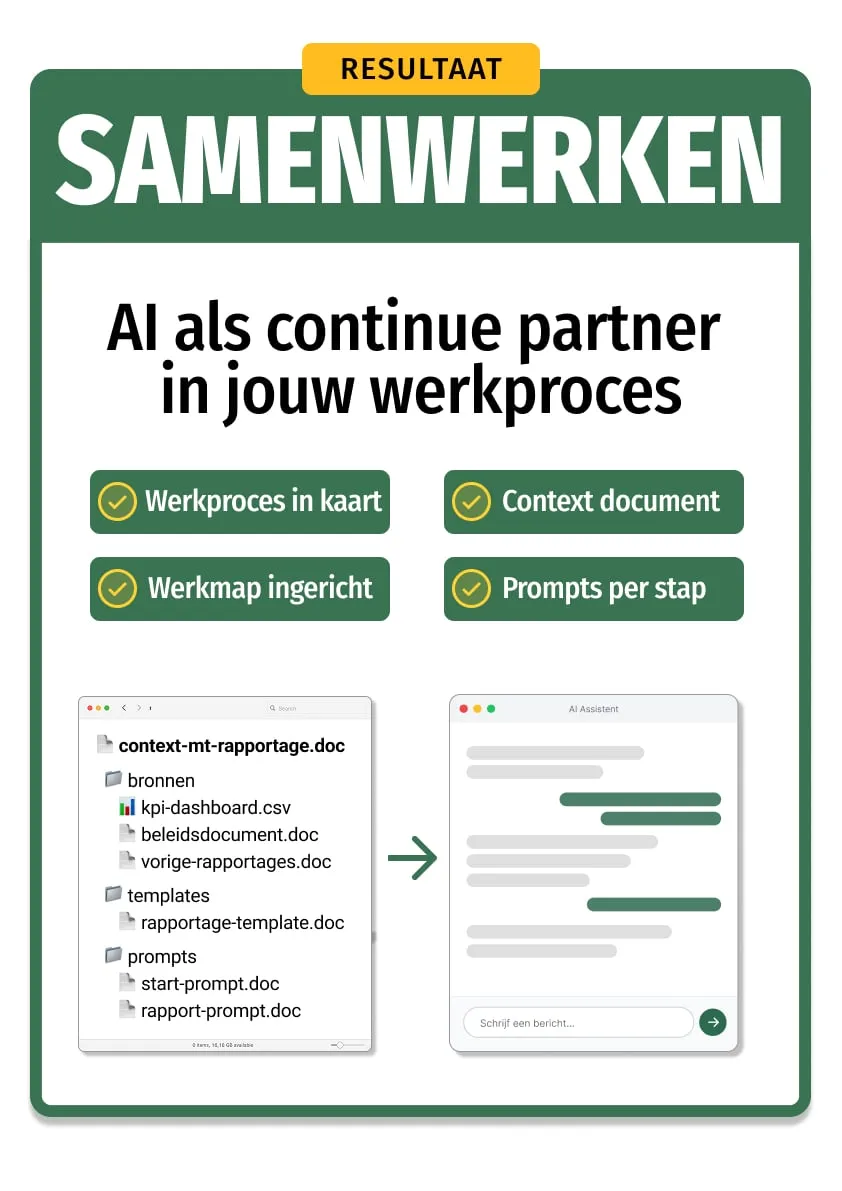
Context document + project folder
Prompts & Testing
1 hour
- • Per step: Input, Prompt, Output
- • Test with real data
- • Document the workflow for reuse
Tested prompts per step
What you’re building toward
A workspace your team can use right away
After the course you'll have a complete workspace for one workflow: a context document that tells AI what it needs to know, sources and templates for each step, and tested prompts your colleagues can pick up and run with.
Initial setup: 30-60 min. Then 80% reusable.
The 3-step rule
Most workflows fail with AI because you try to cram too much into a single prompt. A monthly report, a competitive analysis, a project proposal: ask for it all at once and you’ll get generic output back.
The fix is simple: break your workflow into 3 steps with a clear input and output for each. Step 1 collects and structures data. Step 2 analyzes and interprets. Step 3 creates the final product. Smaller steps, better results.
But steps alone aren’t enough. AI has no memory between conversations. Everything it needs to know about your organization, your audience, your style, and your quality standards goes into a context document. That document is the difference between generic output and output that sounds like it came from a colleague.
Same prompt, same data. The difference is the context document.
The training opened our eyes to what AI can actually do. We know where to start now. Working with context documents made an immediate difference, and the output is genuinely usable.

Jesse van Driel
Digital Learning Specialist · VodafoneZiggo
Practical information
| Duration | 4 hours |
| Format | On-site |
| Group size | 9-12 participants |
| Language | NL / EN |
| Investment | €2.450 per group |
| Prerequisites | Copilot Fundamentals completed |
| Materials | AI Workflow Canvas + context document + workspace + tested prompts |
Your trainers
Our trainers work with organizations like VodafoneZiggo, Rabobank and DPG Media.





Frequently asked questions
How much time does it take after the course to set up a workflow?
Which workflows is this suitable for?
Do I need to complete other courses first?
Do we work with our own material?
Is the course tool-agnostic?
Related articles
Building Your AI Knowledge Base: From Scattered Documents to a Working Memory
AI knows nothing about your organization. A knowledge base changes that. But most documents aren't AI-ready. Here's how to fix them.
Why PDFs Don't Work With AI (And What to Do About It)
PDFs are made for people, not for language models. Tables shift, columns bleed together, numbers get fabricated. Here's how to prevent that.
Book this course for your team
In a quick 30-minute call, we'll figure out if this course is the right fit for your team.

We respond within 2 business days
What comes next
Part of our AI Skills Curriculum. Each course builds on the previous one.
Discover the full curriculum
AI Skills Program